
See what happens on the road
Fleet dash cameras give you a clear view of the events that matter. Capture the road and the cab, document incidents, review complaints and build coaching conversations around what the camera recorded.
Every clip is matched to the vehicle location, speed and time on the map, in the same platform as your GPS tracking.
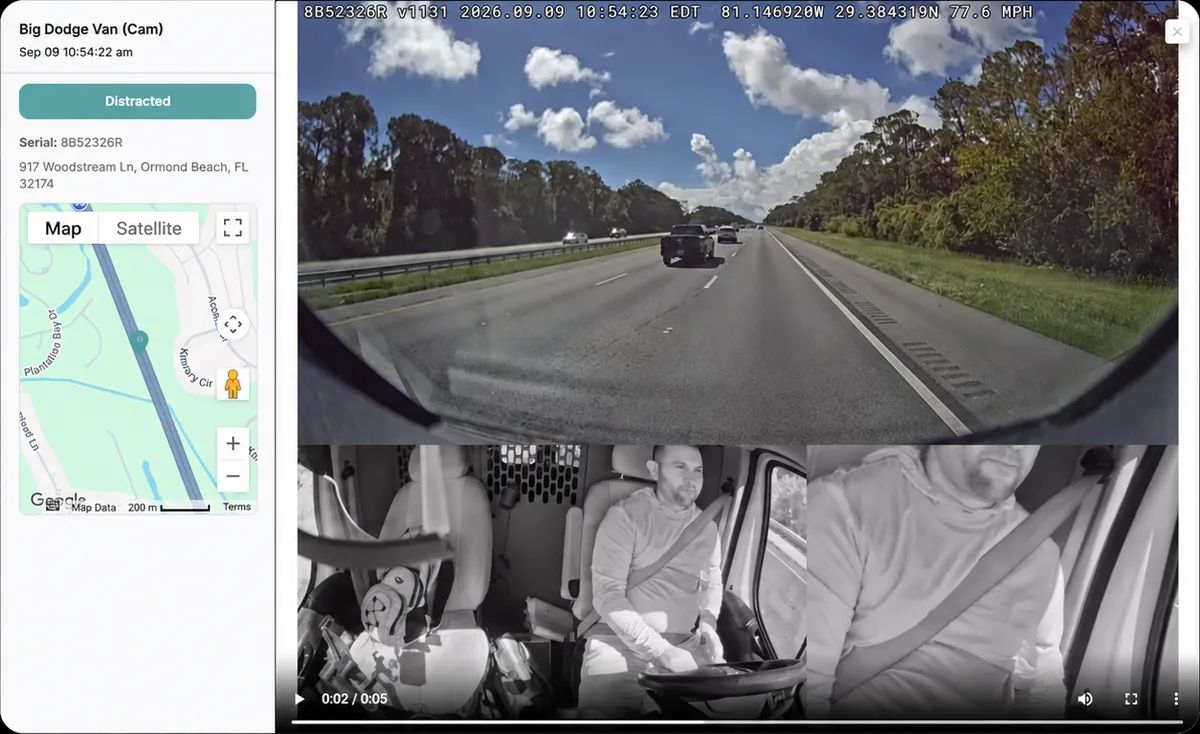
Camera options
We match the camera layout to your vehicles and to what you need to review.
Road-facing cameras
Record the road ahead to add context to traffic incidents and reported events.
Driver-facing cameras
Add an in-cab view for event review and coaching. Our standard dual camera records road and cab.
Side, rear and cargo views
Add left, right and rear or cargo cameras for trucks, vans and box trucks.
Multi-camera systems
Expandable systems support up to five cameras on one vehicle.
Video telematics features
Event clips
- AI-triggered and driver-triggered video
- Automatic upload to the cloud
- Clip linked to location, speed and time
Live view
- Look in on a camera from your computer or phone
- Available while the vehicle is on and connected
AI event detection
- Tailgating
- Distracted driving and phone use
- Hard braking and harsh driving
Alerts
- Email and text alerts
- Audible in-cab warnings for the driver
Cloud storage
- Play back and download clips
- Request footage on demand from the camera
GPS integration
- All-in-one camera and tracker
- Works with our GPS fleet tracking platform
From pilot to the whole fleet
Pilot
Start with a few vehicles to agree on the camera views, how events are reviewed and how you will measure results.
Vehicle assessment
We review vehicle types, power, mounting positions, cable routes and existing tracking equipment.
Installation
We install and check every camera view, power, recording and connection.
Configuration
Event settings, alerts, user access and GPS integration.
Training
We show your team how to review clips, retrieve footage and coach drivers.
Support
Maintenance and repairs from our Jacksonville service center.
Set your camera policy first
Decide how your fleet will use video before the cameras go live, and put it in writing.
Recording
Why footage is collected, which views are used, and how live view and audio are handled.
Retention
How long clips are kept on the camera and in the cloud, and how important clips are saved.
Access
Who can view, download and share footage, and how outside requests are handled.
Talk to your drivers
Explain where the cameras are, why you record, who sees the video and how coaching works.
Dash camera questions
Fleet dash cameras
Do the cameras record all the time?
The cameras record while the vehicle is running. Events are saved and uploaded automatically, and other footage can be requested from the camera.
Can I see the cameras live?
Yes, from your computer or phone, while the vehicle is on and connected.
Do you install school bus cameras too?
Yes. We install interior and exterior school bus camera systems with DVR recording.
Do the cameras work with GPS tracking?
Yes. Video and location show in the same platform, so every clip is on the map.
Plan the right cameras for your fleet
Tell us about your vehicles and the views you need. Se habla español.